deerso Developer API
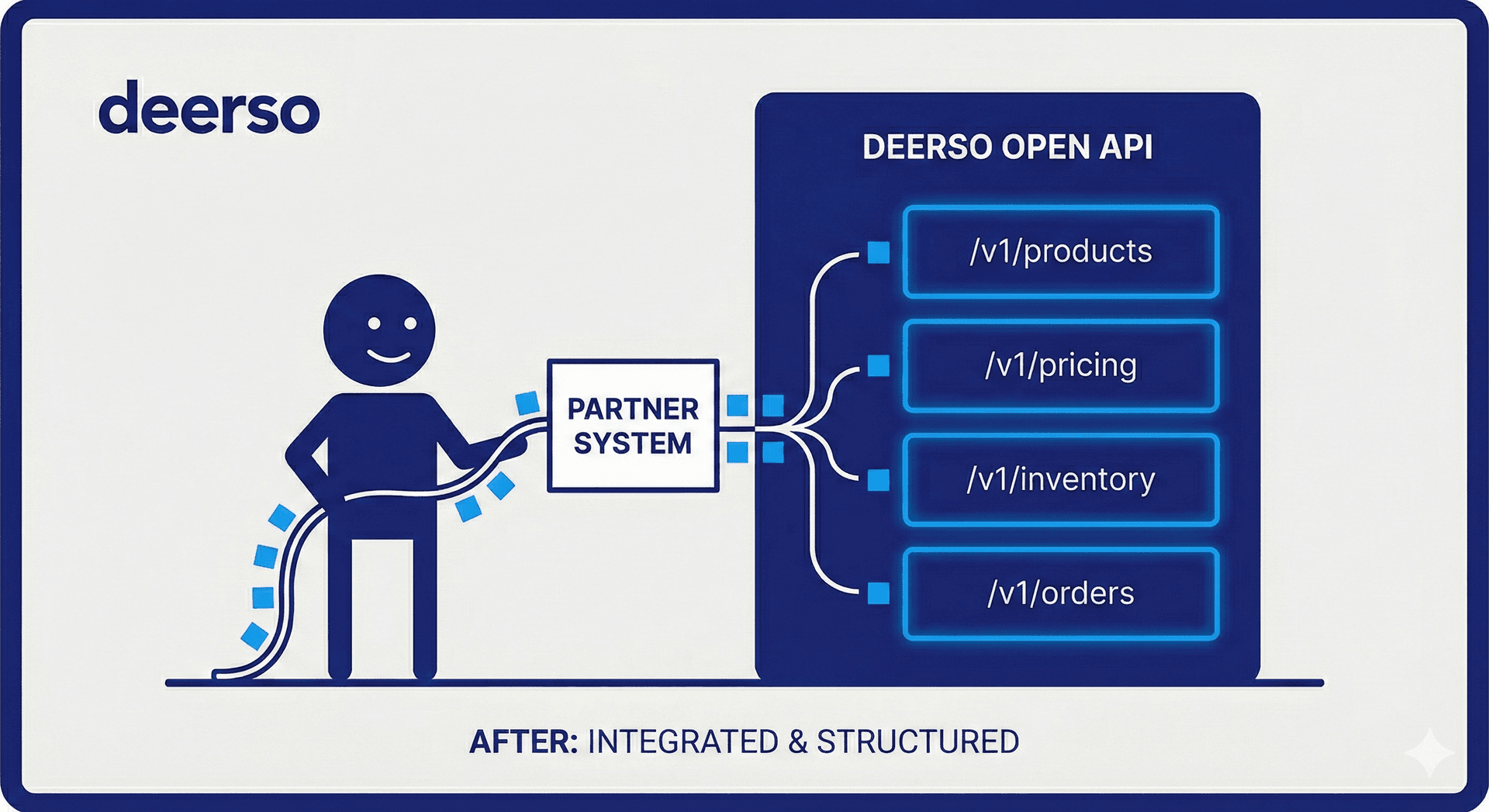
The first hardware retailer API that AI agents can do business with. Search products, check prices, and place orders — all through REST, MCP, or ACP.
Quick Start
Three steps to your first API call. No API key required for read-only endpoints.
Search Products
curl "https://api.deerso.com/v1/products?q=deck+screws&per_page=3"
Check Price
curl "https://api.deerso.com/v1/pricing/ABC123"
Register for API Key
curl -X POST "https://api.deerso.com/v1/register" \
  -H "Content-Type: application/json" \
  -d '{"business_name":"Acme","contact_name":"Jane","email":"[email protected]"}'
REST API Reference
Base URL: https://api.deerso.com — All read endpoints are public. Write operations require an API key.
Add ?format=ai to any product/pricing/inventory endpoint for AI-friendly response formatting.
| Method | Endpoint | Description |
|---|---|---|
GET | /v1/products | Search products by keyword, brand, or category |
GET | /v1/products/:sku | Get full product details by SKU |
GET | /v1/products/upc/:upc | Lookup product by UPC barcode |
GET | /v1/pricing/:sku | Get pricing with optional competitive comparison |
POST | /v1/pricing/bulk | Bulk price lookup (up to 50 SKUs) |
GET | /v1/inventory/:sku | Check real-time stock availability |
POST | /v1/inventory/bulk | Bulk inventory check (up to 50 SKUs) |
GET | /v1/categories | Full category hierarchy tree |
GET | /v1/categories/:id | Single category with children |
GET | /v1/categories/:id/products | Products in a category |
POST | /v1/register | Register for an API key (instant) |
GET | /v1/account | View API key account info (requires auth) |
Example: Search Products
curl "https://api.deerso.com/v1/products?q=drill+bit&brand=DeWalt&per_page=5"

# Response (truncated):
{
  "data": [
    {
      "sku": "DW1361",
      "title": "DeWalt DW1361 Titanium Drill Bit Set",
      "brand": "DeWalt",
      "price": 29.97,
      "in_stock": true
    }
  ],
  "pagination": { "page": 1, "per_page": 5, "total": 42 }
}
Example: Competitive Price Check
curl "https://api.deerso.com/v1/pricing/DW1361?market_context=%7B%22other_prices%22%3A%5B%7B%22source%22%3A%22HomeDepot%22%2C%22price%22%3A34.97%7D%5D%7D"

# Response:
{
  "sku": "DW1361",
  "price": 29.97,
  "currency": "USD",
  "comparison": {
    "cheapest": true,
    "savings_vs_best_competitor": 5.00,
    "competitors": [
      { "source": "HomeDepot", "price": 34.97, "difference": -5.00 }
    ]
  }
}
Interactive testing available at https://api.deerso.com/docs (Swagger UI)
MCP Server
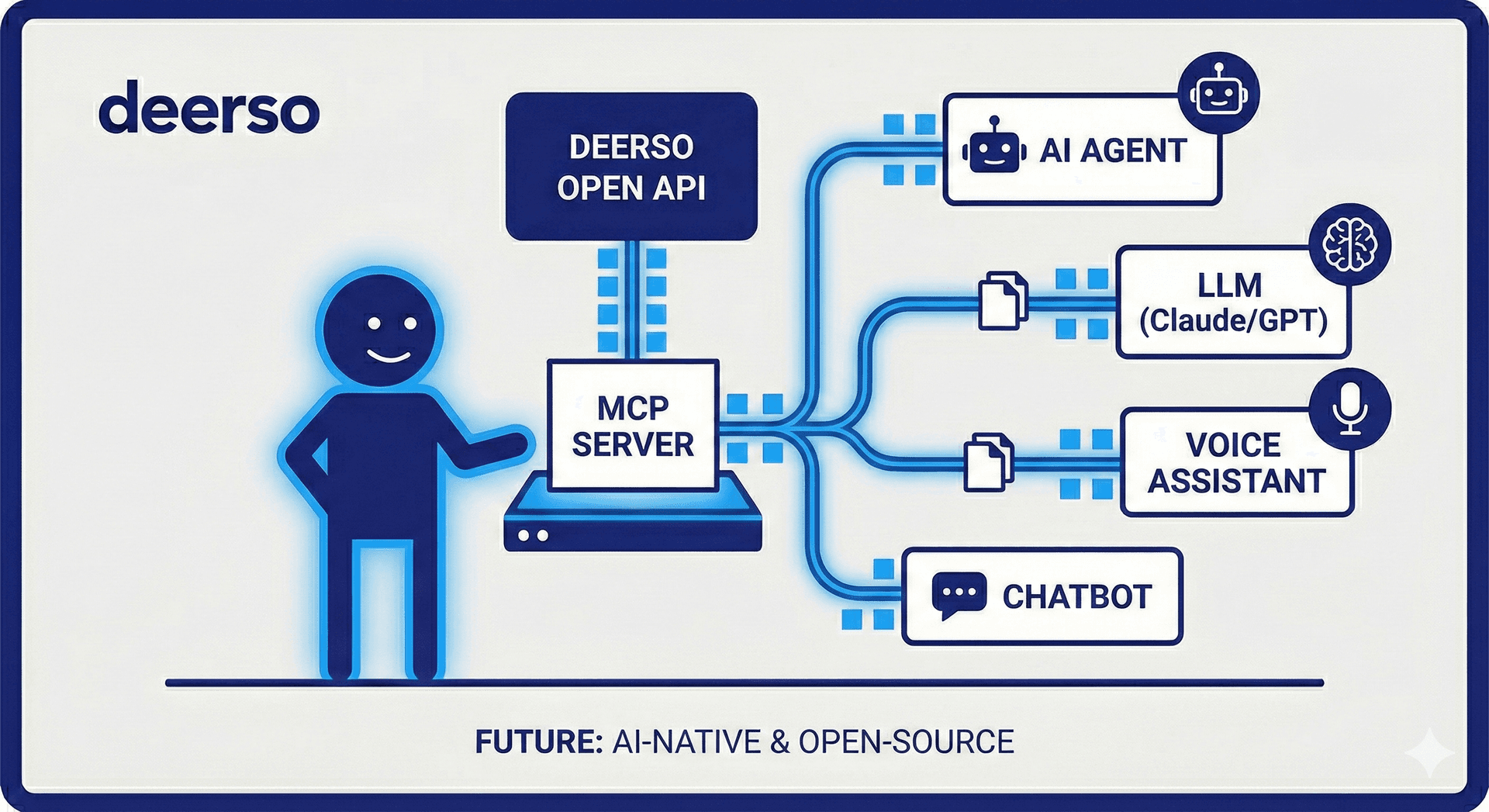
Connect Claude, ChatGPT, or any MCP-compatible AI assistant directly to the deerso catalog. Supports both stdio and streamable HTTP transports.
Claude Desktop / claude_desktop_config.json
{
  "mcpServers": {
    "deerso": {
      "url": "https://api.deerso.com/mcp"
    }
  }
}
Stdio Transport (local CLI)
{
  "mcpServers": {
    "deerso": {
      "command": "node",
      "args": ["./api/dist/mcp/server.js", "--stdio"]
    }
  }
}
Available Tools
| Tool | Description |
|---|---|
| search_products | Search hardware catalog with keyword, brand, and category filtering |
| get_product_details | Get full product info by SKU or UPC barcode |
| check_price | Competitive pricing with optional market comparison |
| check_availability | Real-time stock status for 1–50 products |
| get_categories | Browse the product category hierarchy |
| calculate_project_cost | Multi-product cost calculator with availability status |
| place_order | Create ACP checkout session and optionally complete payment |
MCP Resources
The MCP server also exposes read-only resources your AI can reference:
deerso://catalog/categories   — Full category hierarchy
deerso://catalog/brands       — All available brands
deerso://info/shipping        — Shipping methods & delivery estimates
deerso://info/policies        — Business pricing & return policies
MCP Setup Tutorial
Follow these steps to connect your AI assistant to deerso's product catalog, pricing, and inventory in under 2 minutes.
Choose Your Client
deerso MCP works with any MCP-compatible client. Pick the one you use:
Claude Desktop
Settings → Developer → Edit Config. Edit the claude_desktop_config.json file.
Claude Code (CLI)
Create a .mcp.json file in your project root, or run claude mcp add.
Cursor / Windsurf / Other
Check your IDE's MCP settings panel. Most support the same JSON config format shown below.
Add the Configuration
Paste this into your MCP config file. No API key needed — read access is free and instant.
{
  "mcpServers": {
    "deerso": {
      "type": "url",
      "url": "https://api.deerso.com/mcp"
    }
  }
}
That's it. Restart your AI client and the deerso tools will appear automatically.
Try It Out
Once connected, try these example prompts in your AI assistant:
"Search for mouse traps under $20"
Searches the catalog and returns matching products with prices
"What's the price and availability of SKU 712580?"
Looks up live competitive pricing and real-time stock levels
"I need to build a deck. Calculate the cost for 50 deck screws, 20 joist hangers, and 10 post caps."
Returns an itemized cost breakdown with availability for each item
"Show me all product categories"
Returns the full category hierarchy for browsing
"Compare your price on DW1361 against Home Depot at $34.97"
Returns pricing with a competitive comparison showing savings
"Place an order for 5 units of SKU DW1361"
Creates an ACP checkout session ready for payment
Verify Your Connection
You can verify the MCP endpoint is working with a quick curl test:
curl -X POST https://api.deerso.com/mcp \
  -H "Content-Type: application/json" \
  -H "Accept: application/json, text/event-stream" \
  -d '{
    "jsonrpc": "2.0",
    "id": 1,
    "method": "initialize",
    "params": {
      "protocolVersion": "2025-03-26",
      "capabilities": {},
      "clientInfo": {"name": "test", "version": "1.0.0"}
    }
  }'

# Expected response:
# {"result":{"protocolVersion":"2025-03-26",
#   "capabilities":{"tools":{"listChanged":true},"resources":{"listChanged":true}},
#   "serverInfo":{"name":"deerso","version":"1.0.0"}}}
ACP Checkout (Agentic Commerce Protocol)
ACP lets AI agents create and complete purchases on behalf of users. The flow is: create session → update buyer/shipping → process payment.
Create
POST /checkouts
Update
PUT /checkouts/:id
Complete
POST /checkouts/:id/complete
| Method | Endpoint | Description |
|---|---|---|
POST | /checkouts | Create a checkout session with items |
GET | /checkouts/:id | Get checkout session state |
PUT | /checkouts/:id | Update buyer info or fulfillment address |
POST | /checkouts/:id/complete | Process payment with Stripe token |
POST | /checkouts/:id/cancel | Cancel checkout and release inventory |
Example: Full Checkout Flow
# 1. Create checkout session
curl -X POST "https://api.deerso.com/checkouts" \
  -H "Content-Type: application/json" \
  -d '{
    "items": [{"sku": "DW1361", "quantity": 2}],
    "buyer": {"name": "Jane Doe", "email": "[email protected]"}
  }'

# 2. Update shipping address
curl -X PUT "https://api.deerso.com/checkouts/SESSION_ID" \
  -H "Content-Type: application/json" \
  -d '{
    "fulfillment_address": {
      "line1": "123 Main St",
      "city": "Portland",
      "state": "OR",
      "postal_code": "97201"
    }
  }'

# 3. Complete payment
curl -X POST "https://api.deerso.com/checkouts/SESSION_ID/complete" \
  -H "Content-Type: application/json" \
  -d '{"payment": {"token": "spt_...", "provider": "stripe"}}'
UCP Discovery
The Universal Commerce Protocol (UCP) endpoint lets AI platforms like Google AI Mode automatically discover deerso's catalog, pricing, inventory, checkout, MCP tools, and project-shopping workflows. AI crawlers find us at a well-known URL and receive a structured commerce capability manifest.
curl "https://api.deerso.com/.well-known/ucp"

# Returns capabilities manifest:
{
  "protocol": {
    "name": "Universal Commerce Protocol",
    "abbreviation": "UCP",
    "version": "1.1"
  },
  "merchant": {
    "name": "deerso",
    "catalog_size": "136,000+",
    "website": "https://www.deerso.com"
  },
  "capabilities": [
    { "id": "catalog.search", "binding": "rest", "endpoints": [{ "method": "GET", "path": "/v1/products?q={query}" }] },
    { "id": "catalog.product_detail", "binding": "rest", "features": ["sku_lookup", "upc_lookup", "product_qa", "structured_shipping"] },
    { "id": "pricing.bulk", "binding": "rest", "features": ["max_50_skus"] },
    { "id": "inventory.bulk", "binding": "rest", "features": ["max_50_skus"] },
    { "id": "checkout.acp", "binding": "acp", "features": ["cart_create", "shipping_options", "stripe_shared_payment_token"] },
    { "id": "projects.costing", "binding": "mcp", "tools": ["calculate_project_cost", "list_projects", "get_project"] }
  ],
  "bindings": {
    "rest": {
      "base_url": "https://api.deerso.com",
      "docs": "https://api.deerso.com/docs",
      "openapi": "https://api.deerso.com/docs/json"
    },
    "mcp": {
      "endpoint": "https://api.deerso.com/mcp",
      "transport": ["stdio", "streamable-http"]
    }
  },
  "discovery": {
    "llms_txt": "https://www.deerso.com/llms.txt",
    "sitemap": "https://www.deerso.com/sitemap.xml"
  }
}
Competitive Intelligence
Pass competitor prices via the market_context parameter on pricing endpoints or the check_price MCP tool. We'll return a comparison showing where deerso stands.
REST API
GET /v1/pricing/DW1361?market_context={
  "other_prices": [
    {"source": "HomeDepot", "price": 34.97},
    {"source": "Lowes", "price": 32.99}
  ],
  "project_type": "deck_build"
}
MCP Tool
check_price({
  sku: "DW1361",
  quantity: 5,
  market_context: {
    other_prices: [
      { source: "HomeDepot", price: 34.97 }
    ],
    project_type: "deck_build"
  }
})
Authentication & Rate Limits
API Key Registration
Self-service, instant approval. Your API key is shown once at creation — store it securely. Pass it via the Authorization header on authenticated requests.
# Register
curl -X POST "https://api.deerso.com/v1/register" \
  -H "Content-Type: application/json" \
  -d '{
    "business_name": "Acme Hardware",
    "contact_name": "Jane Doe",
    "email": "[email protected]"
  }'

# Use your key
curl "https://api.deerso.com/v1/account" \
  -H "Authorization: Bearer YOUR_API_KEY"
Rate Limits
| Tier | Limit | Window |
|---|---|---|
| Unauthenticated | 60 req | 1 minute |
| Authenticated (API key) | 600 req | 1 minute |
Rate-limited responses return HTTP 429 with a RATE_LIMITED error code. The window is sliding — wait and retry.
Protocol Support
| Protocol | Transport | Endpoint | Use Case |
|---|---|---|---|
| REST API | HTTP | /v1/* | Direct integration, scripts, apps |
| MCP | Stdio / HTTP | /mcp | AI assistant tool use (Claude, ChatGPT) |
| ACP | HTTP | /checkouts/* | AI agent purchasing & checkout |
| UCP | HTTP | /.well-known/ucp | AI platform discovery for catalog, checkout, and project commerce |
Ready to Build?
Register for an API key, explore the Swagger UI, or connect your AI assistant via MCP. Questions? Contact us.